The team came back from MRO Americas with hundreds of badge scans, several promising booth conversations, and enough “good meetings” to make the event feel worthwhile.
Two weeks later, most of those leads were still sitting untouched in HubSpot, while the best conversations were already fading from memory.
The same pattern can play out after any high-stakes aviation or aftermarket event where the booth feels busy, the conversations feel promising, and the real test begins after everyone gets home.
U.S. exhibitors spent more than $30 billion attending trade shows in 2024, according to CEIR research cited by Trade Show Executive. CEIR’s Q3 2024 Index also reached its highest level since the pandemic and came within 4.4% of its 2019 baseline.
Companies are still showing up.
The harder question is whether the leads captured at those events can be traced back to real pipeline once the booth comes down.
This isn’t about effort. It’s about the gap between a promising conversation on the show floor and a deal that actually moves forward.
Why do trade Shows leads get lost after the event?
Trade show leads usually get lost because the follow-up process is unclear, manual, and split across teams.
Marketing may have the badge scans. Sales may own the next conversation. But without clean CRM data, clear routing, and a shared follow-up timeline, good leads can sit untouched until the timing has already passed.
Common causes include:
- Lead data captured manually and inconsistently
- No clear handoff between Marketing and Sales
- Booth conversation notes lost before reps follow up
- Incomplete, duplicate, or untagged records in HubSpot
- Manual lead routing that slows down first outreach
- Every lead treated the same, regardless of intent
- Event results measured by activity, not pipeline or revenue
When Everyone Owns Follow-Up, No One Really Does
After the event, the handoff usually depends on a sentence everyone recognizes:
“We’ll send the leads to Sales.”
That sounds clear enough until someone has to define what “send” means.
Does it mean uploading badge scans into HubSpot?
Assigning owners?
Adding conversation notes?
Setting lifecycle stages?
Creating follow-up tasks?
Routing high-intent contacts first?
If those answers aren’t decided before the event, they get negotiated after the event, when everyone is tired, catching up, and already moving on to the next priority.
That’s where Marketing and Sales start talking past each other.
Marketing may think Sales has enough to act. Sales may think Marketing handed over a list without the context needed to prioritize.
Both sides may have a point.
For aviation and aftermarket teams, that context matters. A booth conversation may involve a future RFQ, a stalled quote, a PBH opportunity, or a key account relationship that needs careful follow-up.
If those details don’t make it into HubSpot, the lead becomes another name in a queue.
The booth was busy. The conversations were real. But when leadership asks what moved into pipeline, the answer is harder to prove than it should be.
What an Effective Trade Show Lead Follow-Up Looks Like
An effective trade show lead follow-up process makes sure every qualified event lead is captured, routed, contacted, tracked, and connected back to pipeline.
It should answer five questions before the event starts:
- Who captures the lead?
- What information gets logged?
- Where does it go in HubSpot?
- Who owns the next step?
- How will results be measured?
Without that structure, even a strong event can produce a lead list that looks promising on Monday and becomes hard to defend by the next pipeline review.
The process doesn’t need to be complicated.
It does need to be agreed on before the event starts.
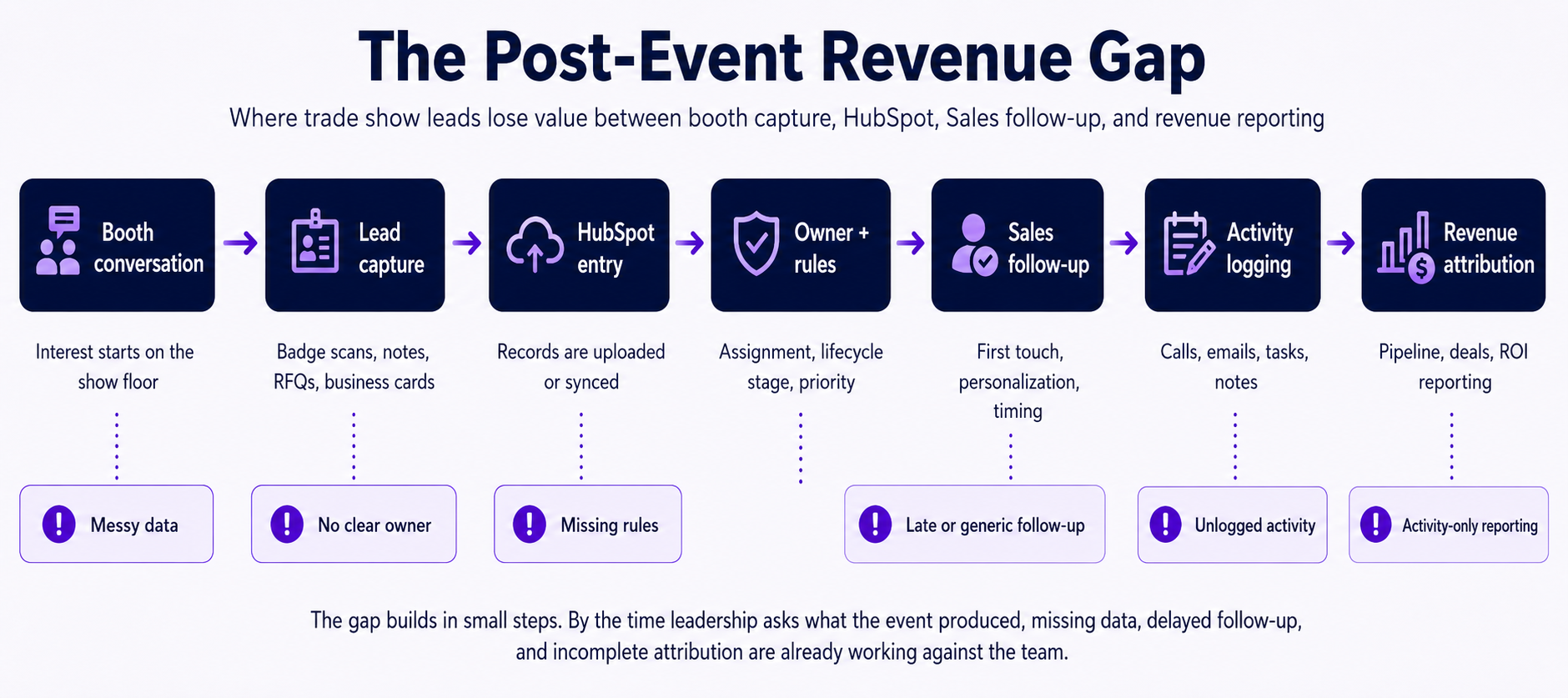
7 Follow-Up Gaps to Check Before Your Next Event
Before the next event goes on the calendar, review the places where follow-up usually slows down, loses context, or disappears from reporting.
These are the gaps worth checking first.
Gap #1: Lead data Comes in Messy
In an ideal world, Sales and Marketing agree on exactly how lead information should be captured before the event starts, specifically in the following areas:
- Which fields are required
- How booth notes should be written
- Where RFQ context should go
- What counts as a qualified event lead
In reality, that’s rarely how the week plays out.
Some contacts come from badge scans. Some come from business cards. Some live in booth notes, rep memories, side conversations, or RFQ discussions that never make it into HubSpot.
By the time the team returns to work, the lead list can look complete from a distance.
The contact names are there. The company names are there. Maybe even the event source is there.
But the details that make follow-up useful are missing.
What did the prospect ask about?
Was there an active need or just a casual booth visit?
Did they mention a specific aircraft platform, repair capability, quote, or upcoming sourcing decision?
Who should follow up, and how soon?
Without those details, Sales has to guess.
That’s how a strong booth conversation turns into a generic “great to meet you” email, or worse, no outreach at all.
Gap #2: No One Owns the Next Step
Ownership sounds simple until the lead list hits HubSpot.
Every qualified event lead needs a clear owner and a clear next action.
The assigned owner should know:
- Why the lead matters
- What conversation happened at the booth
- What follow-up should happen first
- When that follow-up needs to happen
- What should happen if the lead doesn’t respond
In reality, event leads often enter HubSpot before those ownership rules are fully decided.
A badge scan may be uploaded under the person who imported the list. A promising account may sit in a regional queue until someone reviews it. A returning customer may be assigned to the wrong rep because the contact record hasn’t been updated since the last event.
None of these issues look dramatic on day one.
The lead is technically in HubSpot, but the next step still depends on someone manually catching the issue and correcting it.
For a serious booth conversation tied to an RFQ, repair capability, platform need, or key account opportunity, that delay changes the quality of the follow-up.
The prospect remembers what they discussed.
The follow-up doesn’t.
That’s when a warm event lead starts to feel like a cold one.
Gap #3: HubSpot Has the Record, But not the Rules
Getting the lead into HubSpot is only the first part.
The real value comes from what the record triggers next.
A properly built event lead record should carry the right lifecycle stage, event source, priority level, owner, and follow-up task or workflow.
In reality, records often arrive before those rules are ready.
A contact may be tagged as an event lead, but not placed into the right lifecycle stage. Another may have an owner, but no follow-up task. A high-intent booth conversation may look identical to a casual badge scan because there’s no scoring or qualification logic attached.
The record looks organized, but nothing is pushing it forward.
HubSpot can hold the record, but it can’t enforce a process that hasn’t been defined.
When the rules are missing, the team has to interpret every lead by hand. That slows down routing, delays outreach, and makes reporting harder once leadership asks what the event produced.
For aviation and aftermarket teams, this is where good conversations start disappearing from pipeline view.
The lead may be captured.
The next step isn’t.
Gap #4: The First Follow-Up Comes Too Late
The follow-up clock starts earlier than most teams think.
It starts when the booth conversation happens, not when the event ends.
A serious conversation on day one shouldn’t wait until the team gets home, uploads the list, cleans the data, assigns the owner, and writes the first email.
By then, the lead may still remember the company.
But the reason the conversation mattered may already be fading.
For high-intent event leads, the first follow-up should happen within 24 hours. That includes prospects who asked about pricing, discussed an RFQ, mentioned a specific platform or repair capability, requested a meeting, or came from a target account.
The broader event list can usually follow within 24 to 48 hours, as long as the message is still relevant and tied to what happened at the event.
That timing matters because event leads are not the same as cold contacts.
They’ve already spoken to someone. They’ve seen the booth. In many cases, they’ve shared a problem, a need, or a next-step signal.
In our own event follow-up work, the leads most likely to convert were the ones contacted within 24 hours.
That doesn’t mean every badge scan deserves a same-day sales push.
It means the strongest conversations need a faster path from booth interest to relevant outreach.
Otherwise, the first email arrives after the moment has passed.

Gap #5: Every Lead Gets the Same Follow-Up
Not every badge scan deserves the same response.
A casual booth visit shouldn’t be treated the same as a target account asking about pricing, repair capabilities, or an active RFQ.
But after an event, many teams still start from one list and one follow-up template.
The first name changes. The company name changes. Maybe the event name gets dropped into the subject line.
That still doesn’t make the message personal.
A prospect who had a detailed booth conversation can tell when the follow-up was written for everyone. There’s no mention of what they asked about, what problem they raised, or why the next step makes sense.
That’s where teams lose the advantage they created at the booth.
Event conversations usually carry different levels of intent. One person may have stopped by for a brochure. Another may be comparing suppliers before an upcoming sourcing decision. Another may already be a customer with a stalled quote, recurring repair issue, or new platform requirement.
Those contacts don’t need the same message.
Templates can still help. They give Sales a starting point and keep follow-up from being rebuilt from scratch every time.
But they should support the conversation, not flatten it.
High-intent leads need timely, specific follow-up. Lower-intent contacts may need lighter nurture. Existing customers may need account-owner outreach. Partners, vendors, and students may not belong in the sales queue at all.
When every lead gets the same treatment, Sales spends too much time sorting through contacts that were never likely to convert.
The best conversations also lose the focused follow-up that could have moved them forward.
That’s how a full event list can still lead to a thin pipeline.
Gap #6: Follow-Up Doesn't Make it Back into HubSpot
Some follow-up does happen.
A rep sends a direct email after the event. Someone makes a call between meetings. A LinkedIn message goes out because that’s where the conversation continued. A quick note gets added to a spreadsheet because it feels faster than opening the contact record.
The lead was handled, at least from the rep’s side.
But HubSpot may still show no email, no call, no note, no task, and no next step.
That creates problems later.
Marketing can’t tell which leads were actually contacted. Sales managers have to ask around to find out what happened. Leadership sees an event list with very little activity attached to it, even when reps did some of the work.
The record also becomes less useful for the next person who opens it.
A rep may remember the call. The account owner may not. A follow-up email may have been sent. The team may not know what was said, whether the prospect responded, or what should happen next.
The issue usually gets noticed when someone needs an answer quickly.
Which leads were followed up?
Which ones need a second touch?
Which conversations turned into meetings?
Which accounts should Sales revisit next week?
If that activity lives in inboxes, LinkedIn messages, spreadsheets, or memory, HubSpot can’t answer those questions reliably.
The work happens in pieces, but the system never gets the full picture.
When that happens, HubSpot stops being a shared source of truth and becomes another place the team has to manually investigate.
Gap #7: Event Results Stop at Activity Metrics
After an event, the first report is usually easy to build.
Badge scans.
Email sends.
Meetings booked.
Maybe a few notes from Sales about promising conversations.
Those numbers help the team understand activity, but they don’t answer the question leadership eventually cares about most:
Did this event create real pipeline?
That’s where many post-event reports start to fall apart.
The problem usually isn’t that no one tracked the event. It’s that the tracking stops too early. The event source may be attached to the contact, but not carried through to the company, deal, quote, or revenue record.
So the team can say how many people visited the booth.
They can’t always say which accounts moved forward because of the event.
For aviation and aftermarket teams, that matters because trade show revenue rarely appears in a straight line.
A booth conversation may lead to a follow-up call. That call may lead to an RFQ. The RFQ may turn into a quote. The quote may sit for weeks before it becomes a deal.
If HubSpot doesn’t connect those steps, the event’s influence gets harder to prove with every handoff.
By the time budget planning comes around, the team may still believe the event was worth it.
They may even be right.
But belief is a weak position when the CFO wants to know which shows created pipeline, which accounts moved forward, and which events deserve more budget next year.
That’s the real cost of activity-only reporting.
It makes trade show performance look like a marketing recap instead of a revenue story.
How to Fix this Before Your Next Event
The fix starts before the booth opens.
If the team waits until everyone returns to work, the follow-up process is already competing with inboxes, travel recovery, internal meetings, and the next sales priority.
Before the next event, define the process in HubSpot first.
Start with the capture standard.
Decide which fields are required, how booth notes should be written, and where RFQ, platform, repair capability, or account context should be logged.
Then decide what happens the moment a lead enters HubSpot.
Every qualified lead should have:
- A clear event source
- A lifecycle stage
- A lead owner
- A priority level
- A first follow-up task or workflow
- A path for second touch, nurture, or disqualification
From there, separate the list by intent.
High-intent leads should move quickly to Sales, especially if the conversation included pricing, an RFQ, a target account, a current customer issue, or a clear next-step request.
Lower-intent contacts can enter nurture.
Vendors, partners, students, and other non-sales contacts should be tagged correctly so they don’t clutter the sales queue.
Follow-up templates can help, but they should leave room for context.
A useful template prompts the rep to reference what happened at the booth, why the contact showed interest, and what the next step should be.
A weak template only changes the first name and event name.
Finally, make activity logging part of the process.
If Sales sends an email, makes a call, books a meeting, or agrees on a next step, that activity needs to show in HubSpot.
Otherwise, the team can’t see what happened after the event, and the final report will always be incomplete.
The goal isn’t to make the process heavier.
It’s to make the next step obvious before the lead has a chance to stall.
When the System Works, the Event Does too
Trade shows still matter because relationships still matter.
That’s especially true in aviation and aftermarket markets, where a single conversation can connect to a future RFQ, a repair capability need, a PBH opportunity, or a key account relationship.
But the value of an event is rarely decided only on the show floor.
It’s decided by what happens after the conversation is captured, routed, followed up, logged, and measured.
When that system is clear, the team doesn’t have to rely on memory, spreadsheets, or a post-event scramble to work out what happened.
Sales knows which conversations need attention first.
Marketing can see whether the event created movement beyond booth traffic.
Leadership gets a cleaner view of which shows influenced pipeline, which accounts moved forward, and where the next budget should go.
That changes the role of trade shows inside the business.
They stop being isolated marketing activities that need to be defended after the fact.
They become part of a managed revenue motion, with clearer ownership, better follow-up, and reporting the business can actually use.
The booth still matters.
The conversations still matter.
But the system after the event is what determines whether those conversations turn into something the business can measure, repeat, and improve.
Frequently Asked Questions
How quickly should trade Show leads be Followed Up?
High-intent event leads should be followed up within 24 hours, especially if the conversation involved pricing, an RFQ, a target account, or a clear next-step request.
The broader event list can usually be handled within 24 to 48 hours, as long as the message still connects back to what happened at the event.
What makes a trade Show lead high-Intent?
A high-intent trade show lead usually gives a clear buying or evaluation signal.
That may include asking about pricing, discussing a current RFQ, mentioning a specific repair capability, requesting a meeting, sharing a timeline, or coming from an account the team is actively trying to win or expand.
Why do Trade Shows lead fail to convert?
Trade show leads often fail to convert because the follow-up is too slow, too generic, or missing the context from the original booth conversation.
If Sales doesn’t know what the prospect asked about, why the conversation mattered, or what should happen next, the follow-up starts to feel like cold outreach.
How should trade show leads be tracked in HubSpot?
At minimum, each event lead should have a clear event source, lifecycle stage, lead owner, priority level, follow-up task, and activity history.
For stronger reporting, the event source should also connect to the company, deal, quote, and revenue records where possible.
How can companies measure trade show ROI more accurately?
Companies can measure trade show ROI more accurately by tracking event leads beyond badge scans and email sends.
The stronger view connects event-sourced contacts to lifecycle movement, meetings, deals created, pipeline value, closed revenue, and follow-up activity over a 30, 60, and 90-day window.